Documentation
PengCLI is a complete fantasy console environment. It features a project-based workflow, compiled binaries, a professional 256-color VGA pipeline, and built-in visual editors.
Installation & Updates
PengCLI is portable but requires its launcher for the best experience.
IMPORTANT: Always launch launcher.exe. It automatically checks for updates on GitHub, downloads new versions, and ensures your environment is up to date. Launching
pengcli.exe directly will bypass the update system.
- Unzip
PengCLI.zipinto a folder. - Run
launcher.exe. - If an update is found, type
updatein the terminal to install it.
The .PCP Workflow
To create a game, you must follow the Code -> Compile -> Run cycle.
> CODE MYGAME         (Initializes project)
> COMP MYGAME         (Bundles assets into MYGAME.PCP)
> RUN MYGAME          (Runs the program)
System API (peng.*)
These functions manage the console state and standard I/O.
| Function | Description |
|---|---|
peng.setMode(mode) | Switch between "GFX" (Game) and "TERMINAL" (CLI) modes. |
peng.print(text) | Prints text to the terminal history. |
peng.cls() | Clears the terminal history buffer. |
peng.save(file, content) | Saves raw string data to a file. |
peng.load(file) | Reads raw string data from a file. |
Graphics API (peng.gfx.*)
Low-level drawing using VGA palette indexes (0-255).
| Function | Arguments | Description |
|---|---|---|
cls | idx | Clears the screen with a palette color. |
setcolor | idx | Sets the active drawing color. |
putpixel | x, y, idx | Draws a single pixel. |
line | x1, y1, x2, y2 | Draws a line. |
rectangle | x1, y1, x2, y2 | Draws an empty rectangle. |
bar | x1, y1, x2, y2 | Draws a filled rectangle. |
circle | x, y, r | Draws an empty circle. |
fillcircle | x, y, r | Draws a filled circle. |
drawText | str, x, y, idx | Draws text at coordinates. |
getWidth / getHeight | - | Returns screen dimensions in pixels. |
Input API (Polling)
Check user input inside peng.gfx.update(dt).
| Function | Description |
|---|---|
peng.gfx.isKeyDown("key") | Checks if a key (e.g., "space", "w", "up") is held. |
peng.gfx.isMouseDown(btn) | 1: Left, 2: Right, 3: Middle. |
peng.gfx.getMouseX() / Y() | Returns current mouse coordinates. |
Assets & World API
Functions to render your sprites and maps.
| Function | Description |
|---|---|
peng.gfx.drawspr(name, x, y) | Draws a sprite from /sprites. Index 0 is transparent. |
peng.gfx.drawmap(n, tx, ty, tw, th, dx, dy) | Renders a section of map n. Tiles are 8x8 pixels. |
peng.gfx.getmap(n, tx, ty) | Returns the sprite name at the specified tile. |
peng.gfx.setmap(n, tx, ty, spr) | Changes a map tile during gameplay. |
Sprite Editor (EDITSPR)
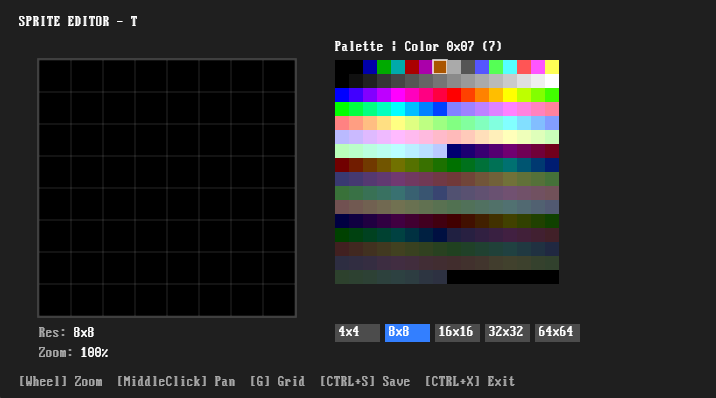
- Canvas: 4x4 up to 64x64.
- Shortcuts:
Wheelto zoom,Middle Clickto Pan. - Keys: 0-F for color,
Gfor grid,Tfor size.
Map Editor (EDITMAP)
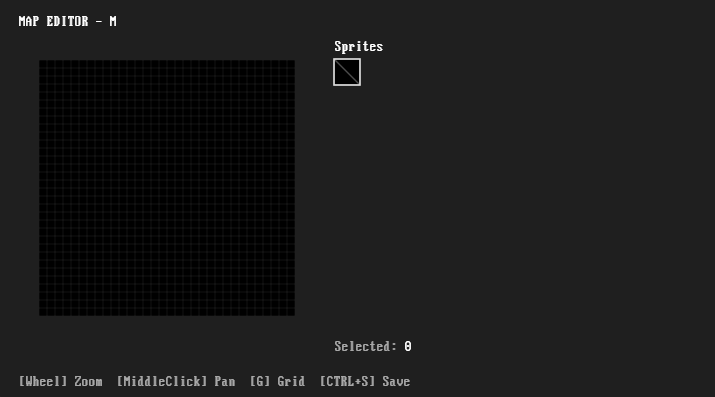
Edits a 64x64 tile world. Automatically imports sprites from your /sprites folder. Multi-tile sprites (e.g., 16x16) are handled automatically.
VGA Palette Reference
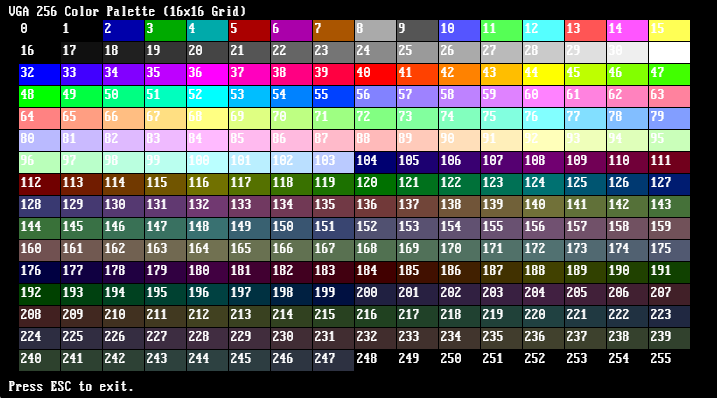
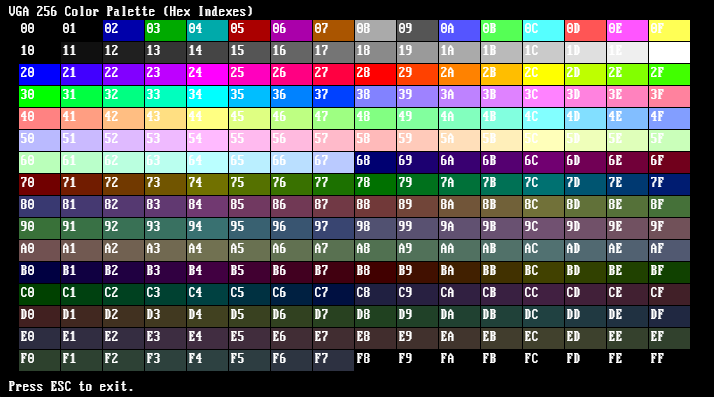
Hello World
peng.cls()
print("Hello, World!")
Basic Game Template
peng.setMode("GFX")
local x, y = 64, 64

function peng.gfx.update(dt)
    -- Input
    if peng.gfx.isKeyDown("right") then x = x + 2 end
    if peng.gfx.isKeyDown("left")  then x = x - 2 end

    -- Collision: check tile 8 pixels ahead
    local tile = peng.gfx.getmap("t", math.floor(x/8), math.floor(y/8))
    if tile == "wall" then x = 64 end -- Simple bounce back
end

function peng.gfx.draw()
    peng.gfx.cls(0)
    peng.gfx.drawmap("t", 0, 0, 40, 30, 0, 0)
    peng.gfx.drawspr("player", x, y)
    peng.gfx.drawText("PENGCLI", 10, 10, 11)
end
PENGUIN POWER!